|
|
Search DSS Finding Data Analyzing Data Citing data About Us DSS lab consultation schedule (Monday-Friday)
*No appts. necessary during walk-in hrs. Note: the DSS lab is open as long as Firestone is open, no appointments necessary to use the lab computers for your own analysis.  
|
Home Reshape World Development Indicators for Stata Analysis
The World Development Indicators is a commonly
used dataset for macro level data. By default it exports the data to a layout that is very inconvenient for analysis. Here you
have two options:
- From the WDI page you can export the data to a usable datataset without the need to reshape it, click here
for instructions (make sure 'Country' is in row and 'Series' in columns, remove 'Time' from column and put it in the page
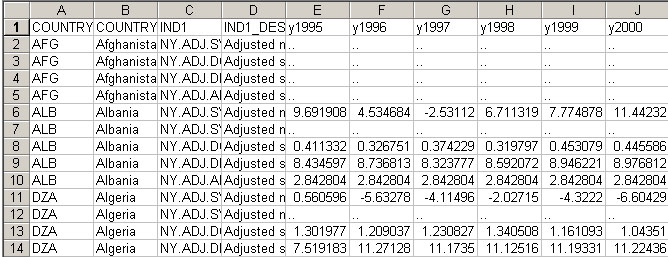
section). WDI data as downloaded from the World Bank web site:
First, open the spreadsheet in Excel and add a "y" in front of the year column headers, so they have the form y1970, y1971 etc. Save the file as as comma separated values (.csv).
Read the file into Stata using the "insheet" command. Next, issue the following commands: drop ind1 gen id = _n reshape long y, i(id) j(year) encode ind1_desc, gen(varnum) label save varnum using vardesc, replace The "label save" command creates vardesc.do, a do file for applying the WDI series descriptors as labels to values of the "varnum" variable. We are going to turn each different value of varnum (each WDI series) into a variable. To keep track of which variable holds the data for which series, we will turn vardesc.do into a program for applying the series descriptors to the variables as variable labels. To do this, edit vardesc.do in Word or another editor so each line has the form: label var data1 `"Adjusted savings: adjusted net savings (% of GNI)"' Finally, issue the following commands in stata: drop id ind1_desc rename y data egen id = group(country_name year) reshape wide data, i(id) j(varnum) do vardesc.do For more on reshaping please check Data Preparation & Descriptive Statistics |